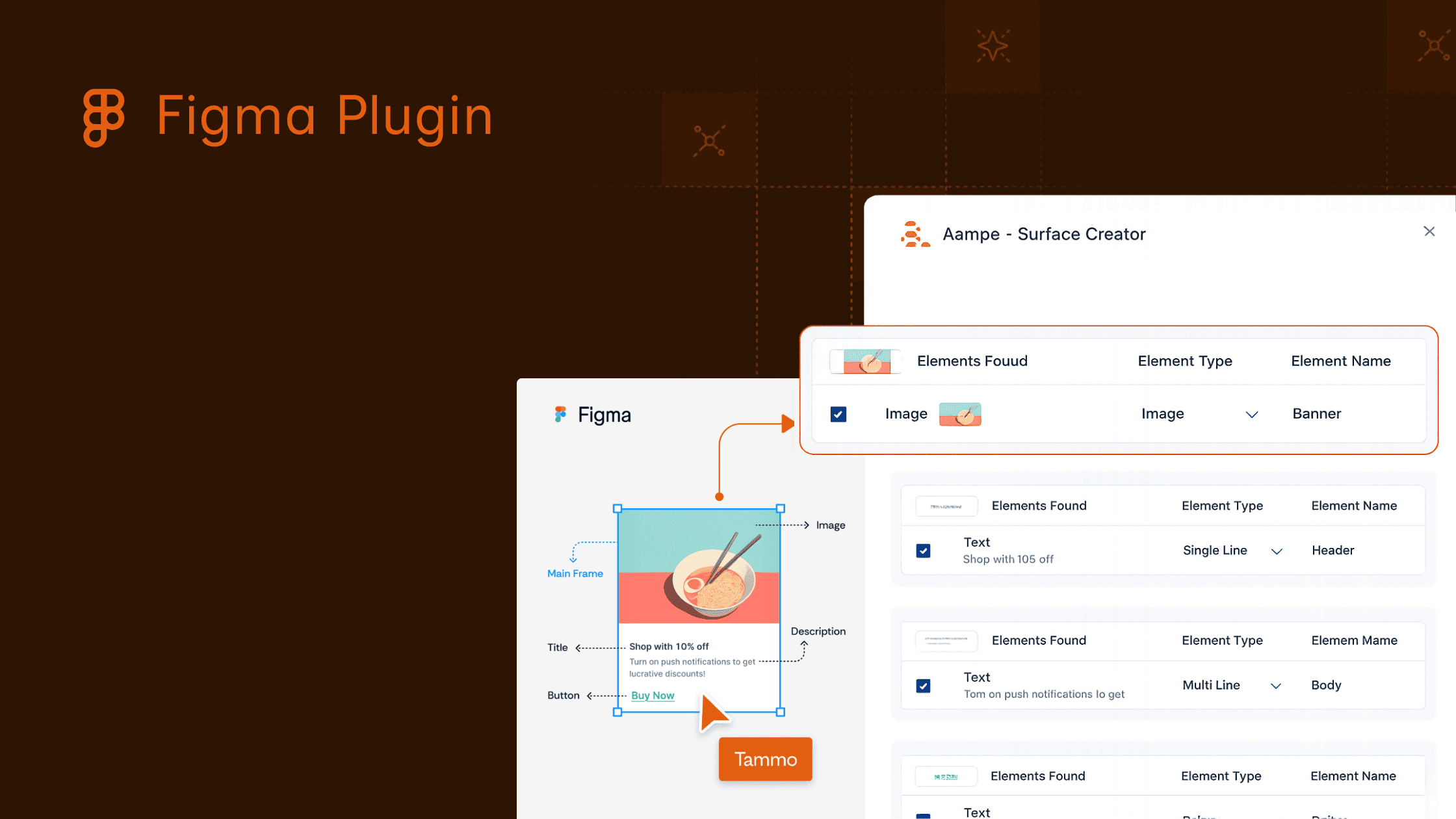
Introducing the Aampe Figma Plugin, Turning Creative Assets Into Agentic Surfaces
Marketing and product teams have spent years building customer experiences inside design tools, then rebuilding them somewhere else before those experiences can go live.
A designer creates a beautiful in-app card, modal, carousel, or product surface in Figma. A marketer defines the message strategy. A product team thinks through placement and behavior. Then the handoff begins. Components have to be translated into fields. Fields have to be named. Templates have to be recreated. Variants have to be checked somewhere outside the design environment where the idea first took shape.
That workflow creates a gap between creative intent and agentic execution.
Today, we’re introducing the Aampe Figma Plugin, a massive upgrade to Aampe's Surface Creator, to help close that gap. It connects Aampe with Figma so teams can turn creative assets into Aampe-ready Surface templates, then preview how Aampe content can render across different variants.
Why We Built the Aampe Figma Plugin
Aampe is built around a simple idea: Every customer should get an experience that adapts to them.
That requires more than better targeting or more campaign rules. It requires a system that can learn which messages, offers, tones, and surfaces work for each individual over time. It also requires content and creative assets to be structured in a way agents can reason about.
For many teams, that structure starts too late.
Creative work often begins in Figma, where teams define how a product surface should look and feel. But the agentic version of that surface needs more than a static design. It needs fields. Components. Labels. Variants. Guardrails. A structure that Aampe’s agents can use to decide what to show, to whom, and when.
Without a better bridge between design and Aampe, teams have to recreate that structure manually. That slows down launches and introduces room for errors. It also keeps designers and marketers from seeing how their creative systems will behave once agents begin personalizing them.
The Aampe Figma Plugin was built to make that workflow faster and clearer.
What the Aampe Figma Plugin Is
The Aampe Figma Plugin helps teams convert Figma designs into Aampe Surface templates.
Inside Figma, teams can select a frame, choose which elements should become part of a Surface, assign component names and types, then send that structure into Aampe. Aampe generates a template with the necessary fields, ready for messages and variants.
The plugin also supports the reverse direction. Teams can pull Aampe content into Figma and see how creative assets look across the different variants Aampe could serve.
That matters because agentic personalization changes what teams need to review.
In a static campaign workflow, teams review one finished asset. In Aampe, teams define a structured creative system. The agent may combine different copy, offers, value propositions, tones, and surface components depending on what it has learned about each user.
The plugin gives teams a way to see that system earlier, inside the tool where creative decisions are already happening.
How It Works
1. Start with a Figma frame
Teams begin in Figma by selecting the frame they want to turn into an Aampe Surface.
That frame might represent an in-app card, a product recommendation module, an onboarding prompt, a contextual help surface, or another product experience where personalized content will appear.
2. Choose the elements that matter
From there, teams choose which frame elements should become part of the Surface.
A headline might become a dynamic text field. A button might become a call to action. An image slot, offer field, description block, or supporting line can each become part of the template structure.
The goal is to preserve the creative shape of the experience while making the content inside it available for agentic personalization.
3. Assign names and component types
Once elements are selected, teams assign names and types.
This step turns design objects into usable content fields. It creates the shared language Aampe needs to understand what each part of the surface does.
Instead of treating the design as a flat asset, the plugin helps translate it into a structured template. That structure gives marketers, product teams, and agents a shared way to work with the surface.
4. Send the Surface to Aampe
After the components are selected and named, teams can export the structure to Aampe in a single click.
Aampe then generates a Surface template with the necessary fields, ready for specific messages and variants.
That removes a major handoff step. Teams do not have to rebuild the same structure manually inside Aampe. The design becomes the starting point for an agentic content system.
5. Preview Aampe content back in Figma
The plugin also lets teams pull content from Aampe into Figma.
That means teams can see how different variants render inside the creative asset itself. They can check whether fields fit, whether combinations still feel coherent, and whether the system gives agents enough flexibility without breaking the design.
This is especially useful for teams building product surfaces where layout, copy, and context all have to work together.
What This Unlocks
The Aampe Figma Plugin makes Surface creation faster, but speed is only part of the value.
It also changes how teams think about creative assets.
A design is no longer only a final mockup. It becomes a structured container for learning. A headline field can test different value propositions. A body field can express different user motivations. A button can carry different calls to action. A surface can become part of an adaptive system rather than a one-time campaign asset.
That creates several practical benefits.
First, teams can reduce manual setup. Designs move into Aampe with less recreation work.
Second, teams can improve quality control. By previewing Aampe content in Figma, teams can catch layout and content issues before launch.
Third, teams can keep design and personalization closer together. Creative teams can see how agentic variants will appear in context, while marketing and product teams can preserve the structure agents need to learn.
Fourth, teams can build a larger and more varied content catalog without losing control over the user experience.
That last point matters most.
Agentic systems need options. If every surface has only one static version, there is little room to learn. If surfaces are structured, labeled, and filled with meaningful variants, Aampe’s agents can begin to understand which approaches work for different users.
The Figma Plugin helps teams create those options from the place where many product experiences already begin.
Why This Matters Now
Product surfaces are becoming a larger part of customer engagement.
Personalization no longer lives only in email, push, SMS, or WhatsApp. It also lives inside the product experience itself. The card a user sees. The prompt they receive. The offer shown on a screen. The framing around a feature. The contextual help that appears at the right moment.
Those surfaces carry some of the richest opportunities for learning because they sit close to user behavior. They are part of the product experience, and they can respond to what each user does next.
But making product surfaces agentic requires better creative infrastructure.
Teams need a way to move from static design to structured personalization without slowing down the people responsible for launching experiences. They need a workflow where designers, marketers, product managers, and agents can work from the same surface definition.
The Aampe Figma Plugin is one step toward that workflow.
It turns creative handoff into creative infrastructure.
Want to see Aampe's Figma Plugin in action?
Book a quick demo to see it for yourself.
Welcome to a faster way to turn creative assets into adaptive customer experiences.